
Uncountable supports mixture design, implemented through a constraint-based Design of Experiments (DOE) framework. While this approach may look slightly different from traditional simplex-lattice or simplex-centroid designs, it operates on the same mathematical foundation and is often more flexible and informative for real-world formulation problems.
Section 1: Understanding Mixture Design as a Constrained DOE Problem
The Math Behind Mixture Design
In traditional DOE, experimental factors are assumed to vary independently. For example, temperature and pressure can each be adjusted freely within their respective ranges, creating a rectangular (box-shaped) design space.
Mixture designs are different because of a defining constraint: All components in the mixture must sum to a constant (typically 100%). For example, in a three-component coating formulation:
- Polymer A + Polymer B + Binder 1 = 100%
Because of this constraint, the components are not independent. Once two component fractions are specified, the third is automatically determined:
- Binder 1 = 100% – Polymer A – Polymer B
Dimensionality reduction and the simplex
This sum constraint reduces the dimensionality of the design space. In the three-component example shown here, even though there are three components, the feasible space is only two-dimensional. Geometrically, this space forms a simplex.
- Vertices represent pure components (100% of one ingredient)
- Edges represent binary mixtures
- Interior points represent ternary mixtures
More generally, for a mixture with N components, the feasible design space is an (N − 1)-dimensional simplex. The same constraint-based formulation and DOE algorithms apply to designs with more than three components; we just use a three-component example here for simplicity.
Key insight: The simplex geometry arises directly from the sum constraint. It is not created by a specific sampling pattern or algorithm—it is simply the natural shape of the constrained design space.
How Uncountable Represents Mixture Designs
In Uncountable, a mixture design is defined by:
- Selecting formulation ingredients
- Applying a sum constraint (e.g., Total = 100%)
- Optionally adding lower and upper bounds on individual components
Together, these constraints mathematically define the same simplex space used in classical mixture design. Any experiment generated by Uncountable automatically satisfies the mixture constraint and lies within the feasible formulation region.
From a mathematical standpoint, this is exactly what makes a design a mixture design.
Different sampling approach, same validity
Traditional mixture designs (such as simplex-lattice or simplex-centroid designs) place experiments at predetermined geometric locations—pure components, edge midpoints, centroids—based on fixed templates tied to the number of components.
Uncountable takes a different approach:
- Experiments are placed using constraint-aware, information-optimal DOE methods
- The design explicitly optimizes for space-filling and information content
- The feasible region can adapt naturally to:
- Component bounds
- Asymmetric constraints
- Irregular formulation spaces
Rather than following a fixed geometric pattern, Uncountable places experiments where they are expected to be most informative, given the constraints you’ve defined. This difference does not change the validity of the mixture design—it changes its efficiency and flexibility. This flexibility becomes even more important when additional constraints (such as component bounds) restrict the feasible region within the simplex.
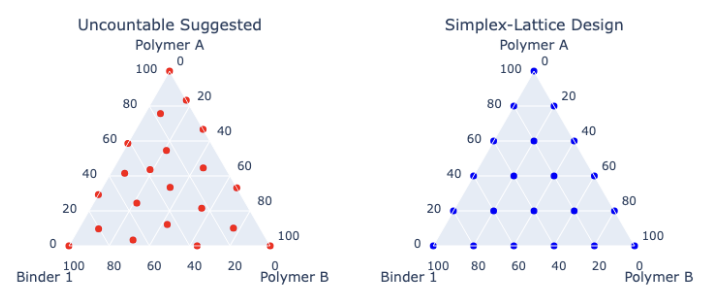
The difference is illustrated below for a simple three-component mixture design with no historical data, where both approaches sample the same simplex but place experiments differently.
Adaptive Mixture Optimization with Suggest in Uncountable
When historical data is available, Uncountable’s Suggest with AI tool extends mixture design using Bayesian optimization:
- A Gaussian Process model is fit within the constrained mixture space
- The sum constraint is enforced during suggestion generation
- New formulations balance:
- Exploration of under-sampled regions of the simplex
- Exploitation of promising formulation areas
This enables iterative, data-driven optimization of mixture experiments—something static classical designs are not designed to do.
Why constraints are the key, not the sampling pattern
- Mixture design is fundamentally a constrained DOE problem
- The sum constraint defines the simplex geometry– Uncountable’s approach operates on the same mathematical space as classical mixture designs
- The difference lies in how experiments are selected, not in whether the design is valid
- Information-optimal, constraint-based designs are often better suited to real formulation problems than fixed geometric templates
Key Takeaway: This is mixture design—implemented in a flexible and information-driven way that extends naturally to realistic constraints and adaptive optimization.
Read the next section for how to set up a mixture design in Uncountable.
Section 2: How to Set Up a Mixture Design in Uncountable
Step-by-Step Tutorial: 3-Component Polymer Coating Example
The screenshots in this article are for an example formulation that contains three components: Polymer A, Polymer B, and Binder 1.
1. Project Setup and Defining Your Mixture Components
- Create a new project for your Mixture Design DOE and choose percentages or parts as the units.
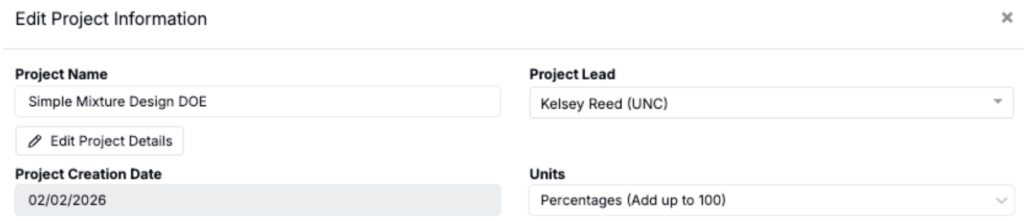
- While you can use percentages or parts for this, going forward in this article we will only reference percentages.
- Create a workflow with a formulation step (if needed).
- Create a recipe using the above workflow, and add all the ingredients you want in your mixture to the recipe.
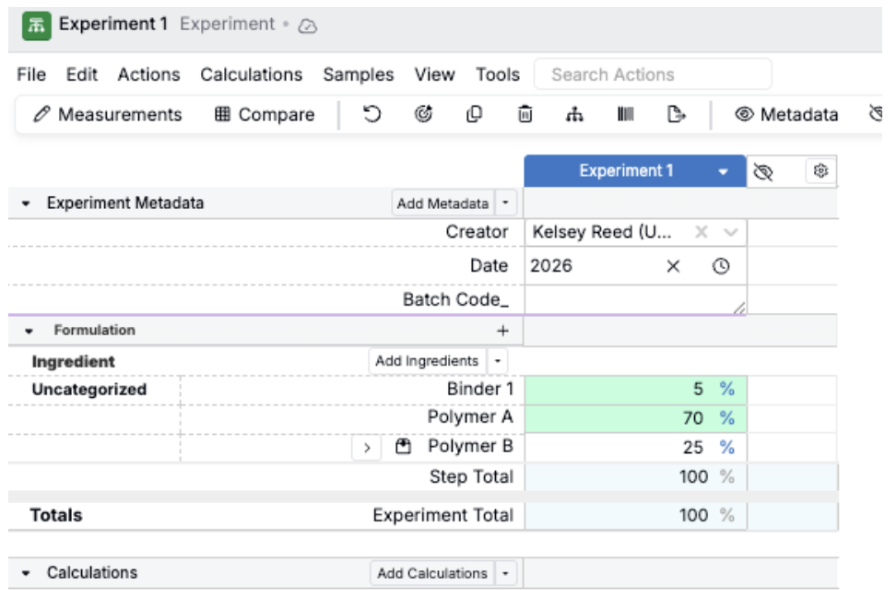
- Note: You can use an existing project with the ingredients you want to test, just make sure the unit settings are parts or percentages.
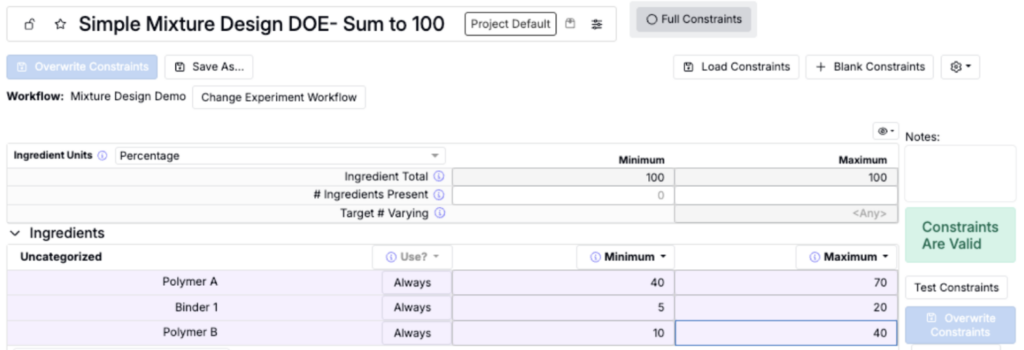
2. Set Up Constraints (Calculate → Set Constraints)
- Set the Ingredient Units as Percentage
- Select Full Constraints
- Add each ingredient as a ‘Vary’ constraint or under settings click ‘Load Recipe as Base’ and select the recipe created in step one to automatically add all the ingredients. See this article for more information on setting up constraints.
- Fill in the Minimum and Maximum Value for each ingredient
- Restricted mixture design is the most common use case (shown in example below), where you include lower and upper bounds on each component.
- Set the Ingredient Total Minimum and Maximum to 100 – This is the total sum constraint that is key to mixture design
3. Generate Design Experiments (Design → Suggest with AI)
Now you have everything set up to be able to design experiments! The first few steps below are the same regardless of whether you have historical data or not:
- Navigate to Design → Suggest with AI
- Select Constraints: Select the Constraint created in step 2 above
- Verify Experiment Workflow is correct and Ingredient Units are Percentage
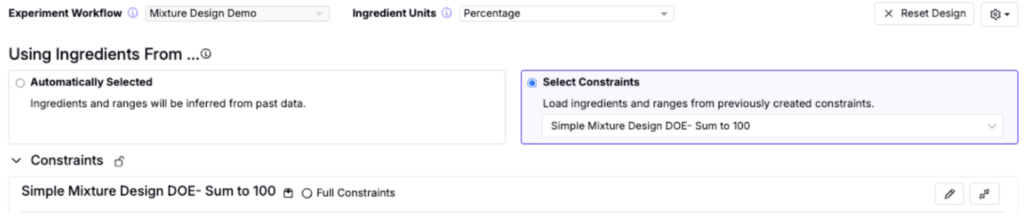
Next, choose the suggestion method based on whether you already have existing experimental data in Uncountable for this formulation space.
Option A: Suggest Screening Experiments (for suggest experiments WITHOUT historical data)
- Select “Suggest Screening Experiments”
- Input the Number of Formulations you would like to suggest
- Click the blue Suggest Formulations Button to generate the suggested experiments
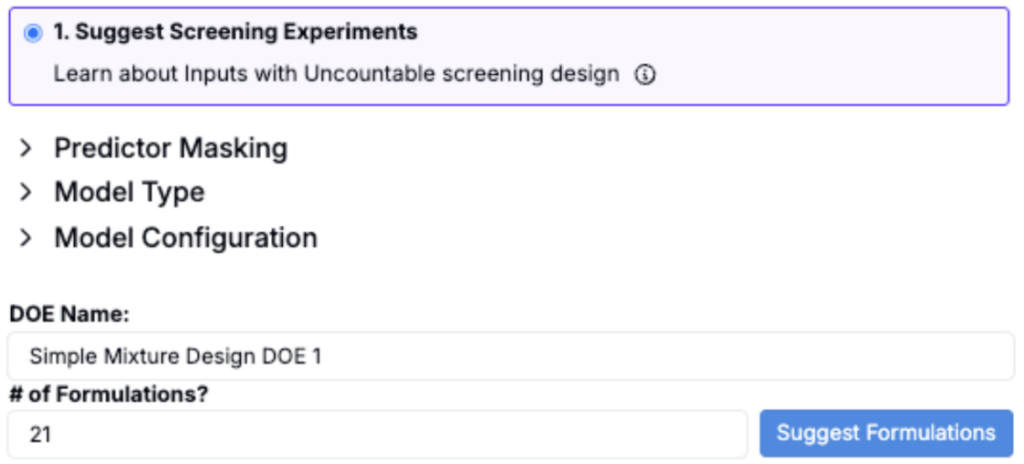
Option B: Suggest with AI (for suggested experiments when you DO have historical data)
- Select “Suggest Optimized Experiments”
- Select training data or spec for Targeting Outputs
- If needed, define specs (output targets), if you have not already
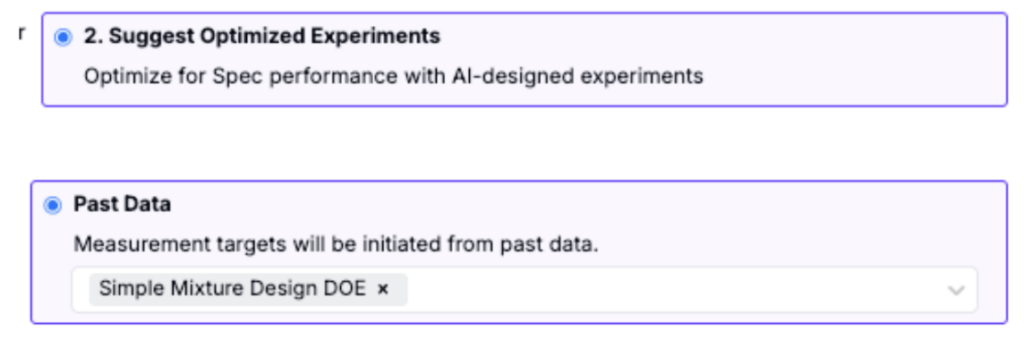
- Input the Number of Formulations you would like to suggest
- Click the blue Suggest Formulations Button to generate the suggested experiments
Section 3: Comparing Design Approaches
A) Case of no historical data: Uncountable Generated Design vs. Traditional Simplex-Lattice
In the case of no existing experimental data, if we select Suggest Screening Experiments with 21 formulations (with no component-specific bounds beyond the sum constraint), here is an example of the formulations generated by the Uncountable algorithm in comparison to a traditional simplex-lattice design.
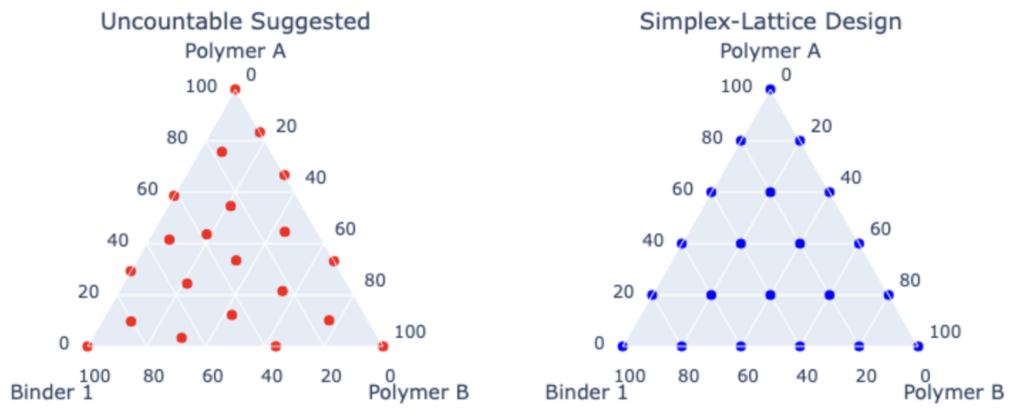
Both approaches generate valid experiments on the same simplex design space. The simplex-lattice design places experiments at predetermined geometric locations, while the Uncountable design distributes points to maximize coverage of the constrained space without relying on a fixed template.
B) With historical data: Adaptive, Optimized Mixture Designs
When existing experimental data is available for the mixture, Uncountable’s Suggest algorithm continues to enforce the same simplex defined by the Ingredient Total Minimum and Maximum set to 100 in the constraints. Building on this historical data, the algorithm suggests new experiments that balance exploration of under-sampled regions with exploitation of promising formulation areas—something a static simplex-lattice mixture design is not designed to do natively. For more details on this approach, see this article.
Section 4: Best Practices & Tips
- Use percentage-based or parts units when setting up mixture design
- Ensure all constraint ranges allow for valid combinations that sum to your target
- Ensure the Ingredient Total Minimum and Maximum is set in the constraint according to your specific use case
- For mixture design with no past data, use Suggest Screening Experiments under Suggest with AI
- For optimization with past data use Suggest Optimized Experiments (also under Suggest with AI)