
On Friday, May 15th, we’re rolling out an update to structured listing pages to make listing columns easier to manage.
What’s changing
Quick Add Columns enabled by default
The Quick Add Columns button will now be enabled on all listings by default. Previously, it only appeared when it was explicitly configured for a listing.
To use Quick Add Columns:
- Click the button and use the checkboxes to add or remove standard listing columns.
- Click Advanced Add to access the Select Columns modal.
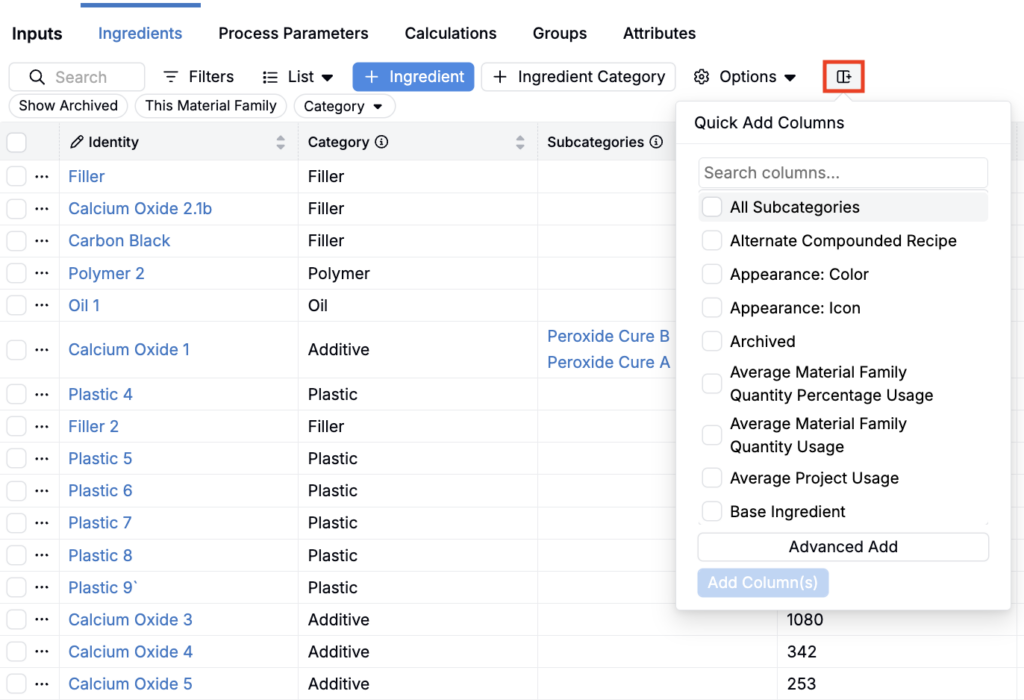
Note that Quick Add Columns simply offers a faster way to manage your listing columns. Users can still add and remove columns via the existing ⚙️ > Select Columns route.
Removing the Quick Add Columns button from a listing
If Quick Add isn’t needed for a particular listing, it can still be hidden. This update only changes the default so more users have immediate access.
To remove the Quick Add Column button:
- Click the ⚙️ icon at the top of the listing page.
- Select Tools > Configure UI Listing Actions.
- Within the Quick Add tab, set Display to None.

Rollout
This update is scheduled to go live on Friday, May 15th. No action is required from end users.