
On Wednesday, April 29th, 2026, we introduced a new selection interface for columns and filters in listings. Enabled by default in all schemas, this update replaces the previous tab-based column selection layout and filter selection menus with a cleaner, more user-friendly experience organized by column type.
What’s changing
Updated column selection interface
Previously, the Select Columns modal used a tab-based selection interface.

Now, the updated modal presents available column types in a cleaner, more direct layout organized by column type. This new structure supports both simple column selection and more advanced selection paths (e.g. transitive column selections).

Updated filter selection interface
Previously, adding a listing filter required selecting options from two menus that contained all available filter types.

Now, when adding column filters, you will use the same selection interface organized by column type. This creates a more consistent experience across your listing actions.

Predefined columns surfaced as shortcuts
The new Select Columns modal also makes Predefined columns easier to access and add. Admins can select columns directly from listings and add them to the predefined column list.
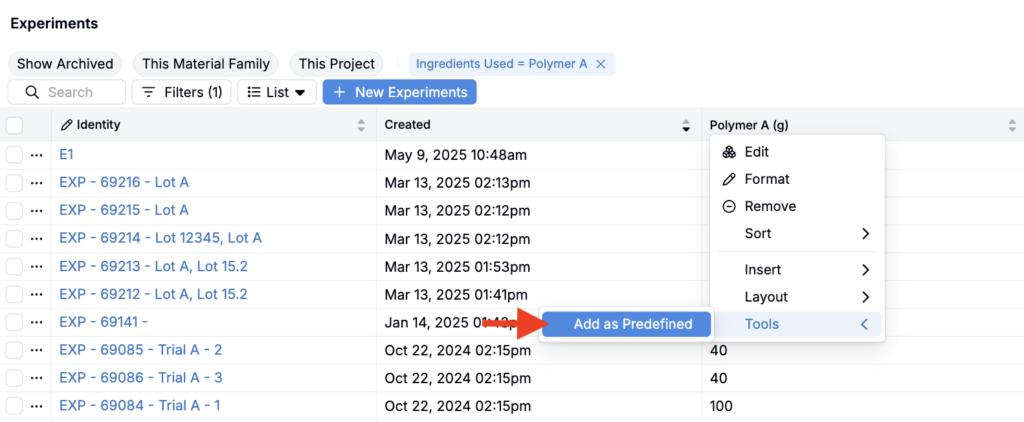
Once added, those columns appear as shortcuts within the Predefined column category for all users, making common column selections faster and easier to find.

How to use
To add a column or filter:
- Select the relevant column category.

- This narrows the available field options based on that category type.

To remove a selection:
- Click the selected category name again. This returns you to the full list of available column or filter options.

Rollout
The new interface is enabled by default in schemas. No action is required from end users.