
The entity header appears at the top of entity pages throughout Uncountable. It provides quick access to essential information and actions for experiments, inputs, outputs, request forms, approval forms, and other definition types.

Header Layout
On the left side, the header contains identification information.
- Entity icon — A visual indicator to distinguish different entity types for quick identification
- Entity name — The name of the current entity. Click to view, edit, and see the created and last edited date.
- Entity definition — The definition type (e.g. Experiment, Ingredient, QA Request, Exposure Request)

On the right side, the header contains entity actions.
- Lock/unlock icon — Lock entities to prevent editing
- Associated notebooks icon — Access linked notebooks (on experiments)
- Notes — Opens a movable popover modal for quick note-taking (on experiments)
- Definition selector — Switch between different entity definitions
- Favorite icon — Mark entities as favorites for quick access
- Tags — Add or view entity tags for organization and filtering
- Comments — Create or view comment threads on the entity
- Entity links — View and manage connections to related entities
- Icon/color options — Customize the entity’s visual appearance
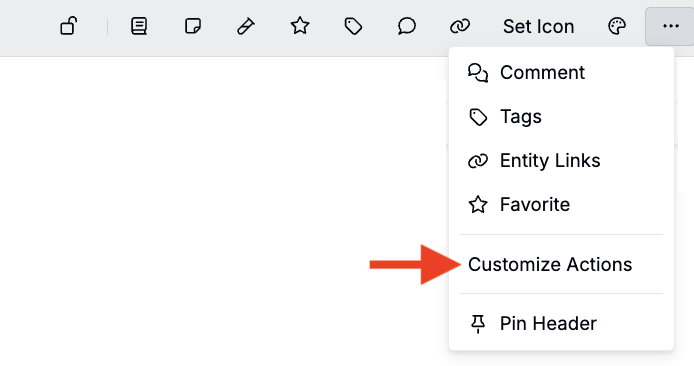
- Options menu (…) — Access additional actions including:
- Customize Actions — Configure actions appear in the header.
- Pin Header — Pin the header to the top of the page so it stays visible while scrolling

Configuring the Entity Header
The entity header can be customized at two levels: personal and organization-wide.
Personal Customization
Individual users can customize which actions appear in their own entity headers:
- Click the options menu (…) in any entity header
- Select Customize Actions
- Pin or unpin specific actions to show or hide them by default
Personal customization applies to all entity headers for that user only.
Admin Configuration
Admins can configure default entity header actions for all users in the organization:
- Navigate to Company-Wide Settings > Platform Config
- Use the Entity Page Header Settings section to update pinned actions and static header components.
- Pinned actions will appear by default in all entity headers for all users within the schema
Admin settings provide consistent defaults while allowing individual users to further customize their own experience.
