
You can now access multiple schemas (workspaces) from a single Uncountable URL. This means users no longer need to navigate to a different URL or maintain separate accounts to work across environments like customer, test, sandbox, production, or dev.
What’s changing
Multi-schema access per user
Before: To give a user access to a separate schema while keeping SSO intact, they typically needed to use a different URL or have a separate dummy account created.
Now: Users can be added to multiple schemas on the same URL. Admins can grant access normally, and users will see all schemas they have access to from a single login.
Switching between schemas
Before: Switching environments required navigating to a different URL entirely.
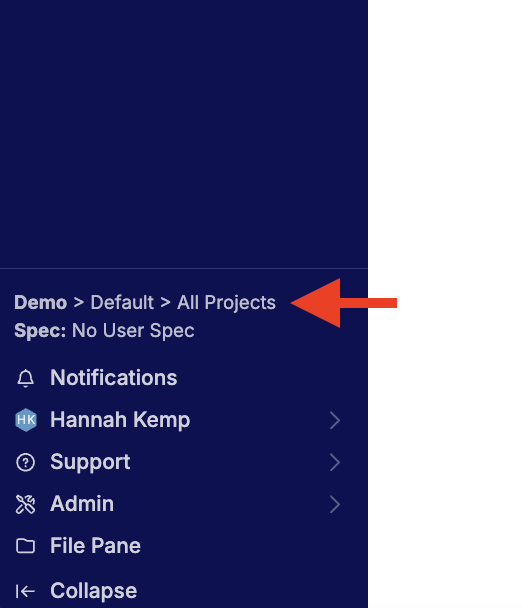
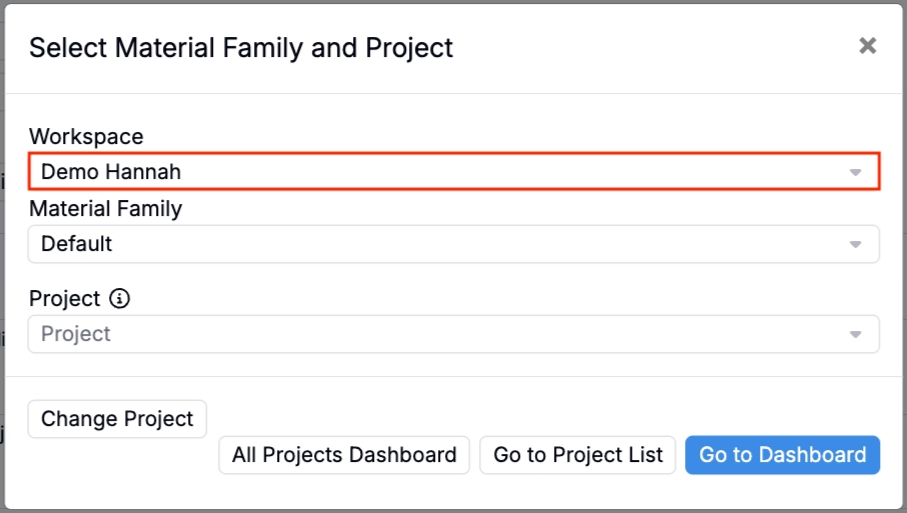
Now: Users can switch between schemas directly in the platform by clicking the breadcrumbs in the bottom-left corner (the same area used to switch between Material Families and Projects) and selecting the desired workspace from the popup that appears.
Rollout
This feature is available now. Users with access to multiple schemas will see them in the Workspace menu when clicking the breadcrumbs at the bottom of the Uncountable navigation bar. Admins can still add users to the relevant schemas as they normally would.