
Uncountable users have a number of options for bringing measurement data into the platform. Depending on your needs, you can:
- Upload files manually, directly on the Enter Measurements page
- Automate data ingestion from lab instruments using SFTP or API connections
- Connect directly to compatible instruments via Serial/USB
| Import Method | How Data Is Sent | Automation Level | Example | Supported File Types |
|---|---|---|---|---|
| Manual Upload | Upload Data modal on the Measurements view of experiments | Manual | Ad hoc uploads of measurement files, including outputs, conditions, and metadata | Any machine-readable file (e.g. .csv, .txt, .xlsx, .dat etc.) |
| SFTP | Files sent via SFTP server | Can be manual or automated | Automated nightly batch uploads from rheometers, battery cyclers, etc. | Any machine-readable file, (e.g. .csv, .txt, .xlsx, .dat etc.) |
| API | Files sent via HTTP POST | Automated | Real-time uploads of measurement data from HPLC, NMR, or other smart systems | Any machine-readable file, (e.g. .csv, .txt, .xlsx, .dat etc.) |
| Serial Port/USB | Direct data stream from instrument | Automated | Real time data capture from scales, pH meters, non-networked devices | N/A |
Manual Upload
From the measurements view of an experiment, users can upload raw machine files directly. Each file is parsed using a pre-configured uploader, which extracts outputs, condition parameters, and output metadata. This method can be used for ad hoc uploads, quick testing, or cases when automating isn’t required.

API Upload
API uploads are ideal when the lab instrument has a modern software interface and supports pre-built APIs for data sharing. This method is frequently used for systems like HPLC, NMR, and other chromatogram-based equipment.
Uncountable supports real-time, programmatic ingestion via HTTP requests. A lab system—such as a LIMS, instrument software, or backend script—sends a POST request to Uncountable’s API with the file content and associated uploader ID.
Key features:
- Enables real-time data transfer to Uncountable, bypassing manual steps.
- Allows for bidirectional data transfer, enabling both file uploads and downloads of formulation data.
- Compatible with TCP/IP-based systems and can accommodate proxy configurations if needed.

SFTP Upload
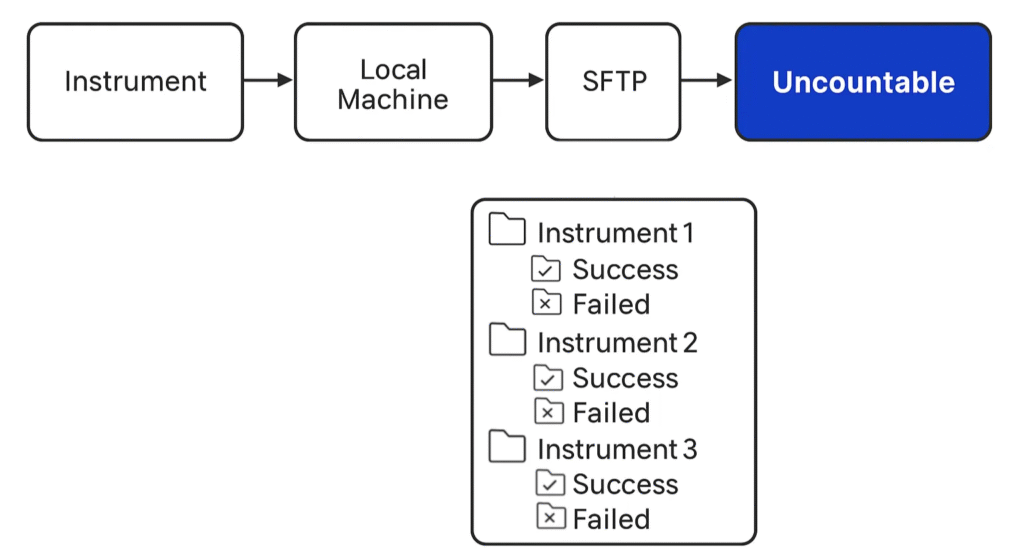
Uploading data via SFTP (Secure File Transfer Protocol) is recommended for lab instruments that lack advanced software interfaces and export data in batch. This approach works especially well for equipment like Instron or Zwick tensometers, rheometers, and battery cyclers.
Key features:
- Uses a secure SFTP server as an intermediate location between lab instruments and the Uncountable platform.
- One SFTP server can support multiple lab instruments, organized into folders. Each folder will have a Success/Failed subfolder where data is placed after processing.
- Uncountable automatically checks the folder on a configurable schedule (e.g., every X minutes or hours).
- New files are retrieved, matched to an uploader, and uploaded automatically.
- Can be combined with instrument exports or scripts for a fully hands-off setup.
- Allows for bidirectional data transfer, enabling both file uploads and downloads of formulation data.
Hosting options:
- The SFTP server is hosted by Uncountable but can be hosted by the customer, if desired.
- IP whitelisting is required in either case to ensure secure access.
- If SFTP is not viable, Uncountable can also support alternative shared file storage like Amazon S3 or Google Drive.
Cyberduck for Manual SFTP Transfers
If you want to use an SFTP integration but prefer to have visual interface, you can also upload files manually to your SFTP folder using Cyberduck.
Cyberduck shows your Uncountable SFTP folder like a standard file browser. Organize data into folders, drag and drop files manually, and Uncountable will still pick them up and process them automatically.
To learn more, refer to Using Cyberduck for Manual Transfers.
Serial Port/USB Upload
For labs using simple, non-networked instruments, Uncountable supports data streaming via a USB or serial port. Devices must support Web Serial API, and the user must access Uncountable through a compatible browser (Chrome or Android).
- Allows live streaming of readings (e.g., from balances or pH meters).
- No need for network setup or file formatting—data is entered directly.
- Great for environments where wireless connections are limited.

Need Help?
If you’re not sure which method is best for your team, reach out to your Uncountable point of contact. We’re happy to help you set up the best uploader or data import strategy for your team’s needs.