Uncountable’s Solver feature is a constraint optimization tool that adjusts ingredient amounts to satisfy one or more locked targets.
This article provides a high-level technical explanation of how the Solver interprets calculations, locks, and ingredient amounts, and why it behaves the way it does.
Solver-Compatible Calculations
The Solver only works with input calculations that follow a predictable, differentiable structure. These include:
- Weighted Sum / Weighted Average calculations
- Composite calculations
These calculation types behave linearly with respect to ingredient amounts, which allows the Solver to determine how changing each ingredient affects the final calculation.
If a calculation shows a lock icon in Solve Mode, it is solver-compatible. If no lock appears, the Solver cannot use that calculation as a constraint.
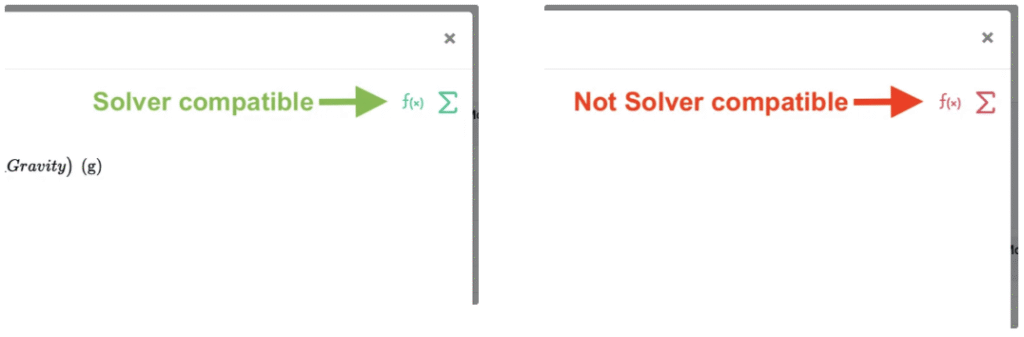
Additionally, in the Edit Calculations modal, a green f(x) in the top right corner indicates a Solver compatible calculation and a red f(x) indicates a non-Solver compatible calculation.
Why only these types?
Because they create mathematical expressions with a clear relationship between ingredient amounts and the calculated value. This allows the Solver to compute how to adjust ingredients to reach a target.
Locked Calculations Become Constraints
When you type a new value into a calculation and lock it, you are adding a precise mathematical condition: “This calculation must equal this target value in the final recipe.”
Examples:
- Tg = 25 °C
- NVM = 85%
- OH Number = 150
- Weight % of Monomer 3 = 40%
Column Calculations as Constraints
Column calculations represent ingredient-level contributions. When locked, they act as constraints for the overall solve.
- Locking column values creates a constraint requiring all those row values to match their locked targets.
- When locked, one constraint per ingredient row is added.
- Column constraints combine with bottom calculations for complex solving.
Column solving is especially useful for setting percentage distributions or proportionality rules.
Locked vs. Unlocked Ingredients
Locked ingredient amounts must remain fixed. Unlocked ingredient amounts can be adjusted by the Solver and must have a starting value (cannot be blank). Solver solutions require enough unlocked ingredients (adjustable variables) to satisfy all locked constraints.
Infeasible Problems
The Solver will report that a problem is “infeasible” if there are too many constraints competing for too few adjustable variables. To resolve this, you can remove constraints or use the Tolerance Percent to give each constraint a percentage of flexibility.
Solver may also not be able to find a solution when:
- A calculation is hidden but still has an active lock
- A calculation is not solver-compatible
- Constraints mathematically contradict one another
- Column locks + calculation locks create implicit conflicts
Use the Solver/Locks side panel (Search Actions > “Solver/Locks”) to identify hidden or conflicting locks.
Optimization Objective = Closest Possible Formula
When more than one solution satisfies all constraints, the Solver chooses the one that is most similar to the original recipe.
Technically speaking, it minimizes the sum of squared changes to ingredient amounts (also known as an L2 norm or Euclidean distance minimization). This objective penalizes large changes more heavily than small ones.
Results
- Solver avoids extreme or unintuitive adjustments
- Changes are distributed across all unlocked ingredients
- The solution feels “reasonable” to a formulator
For example, if changing one monomer by 230 g and changing four monomers 10-20g each are both possible solutions, the Solver will choose the second option.
Why Blank Ingredient Values Cannot Change
Solver requires a mathematical relationship between ingredient mass and calculated values. A blank value:
- Represents no mass contribution
- Has no differentiable effect on calculations
- Cannot be modified within the optimization structure
Therefore, Solver always treats blank values as fixed, even if the lock icon is open. To allow Solver to adjust an ingredient, assign any placeholder amount (e.g., 0 or 1 g).
Normalization
After Solver finds ingredient amounts that satisfy all constraints, it performs a normalization step to ensure ingredient ratios and dependent calculations remain consistent if possible.
If it is not possible to satisfy all constraints while maintaining ingredient ratios, a banner will appear indicating “Ingredient ratios were modified by normalization”. This is expected behavior and indicates the Solver successfully balanced your constraints.
Advanced Settings
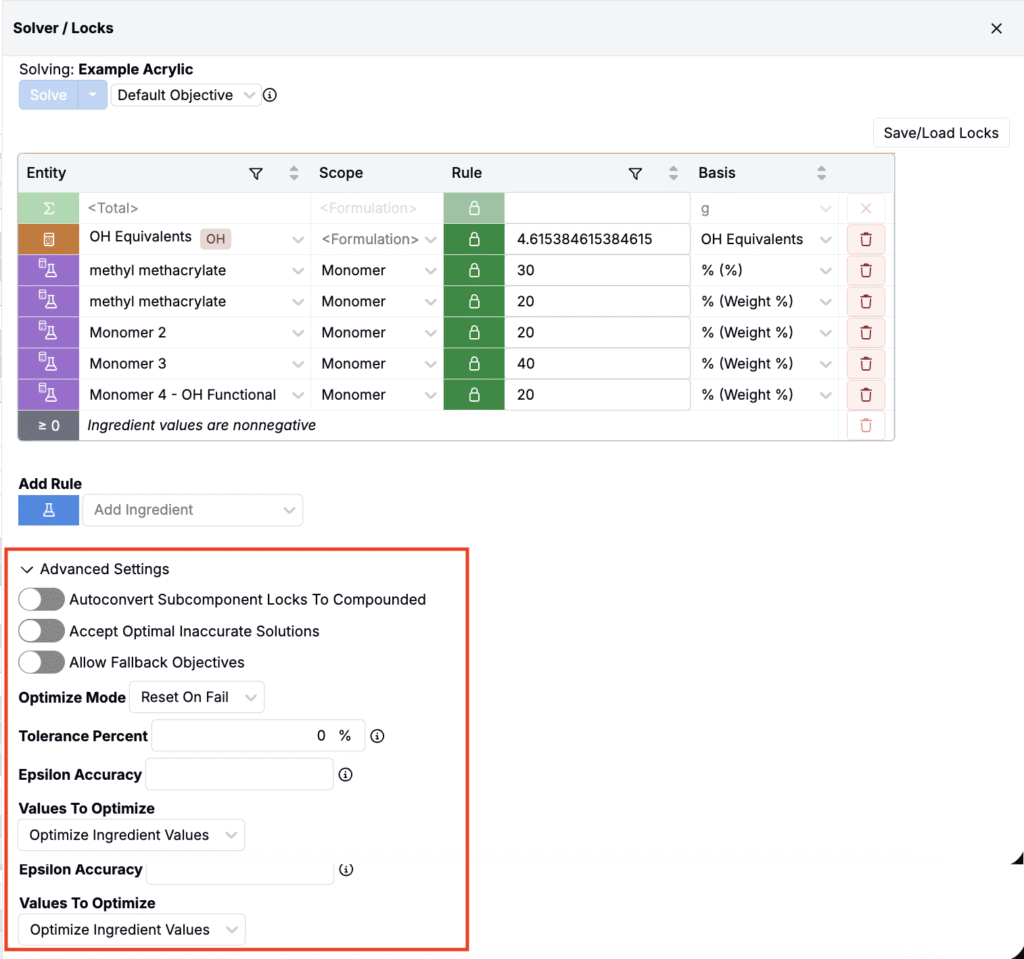
In the Solver/Locks sidepanel, under Advanced Settings, have a range of additional settings available that allow users to adapt the solver behavior to their use case.
Accept Optimal Inaccurate Solutions
This is particularly useful when working with high precision starting values, but wanted to allow for slight flexibility in precision of solutions.
Allow Fallback Objectives
Enabling this will allow you to rank multiple objectives to attempt to use.
The available objectives are Default, Proportional, and Custom (allows user to specify a target calculation to optimize for.
Optimize Mode
When constraints cannot be met fully, you can choose “Reset on Fail” which will make no changes to ingredient values or “Optimize on Fail” which will meet the constraints as closely as possible, but not exactly.
Tolerance Percent
Enables flexibility to all fixed value constraints of the percentage specified.
Epsilon Accuracy
This value overrides the default epsilon accuracy value (1e-5) used in the solver. Reducing this value can prevent degenerate solutions.
Values To Optimize
Users can choose whether to optimize ingredient values (standard) or process parameter values.
The Optimize Parameter Values option will treat all ingredient values as fixed and treat any process parameters involved in locked calculations as variables that the Solver can change.