
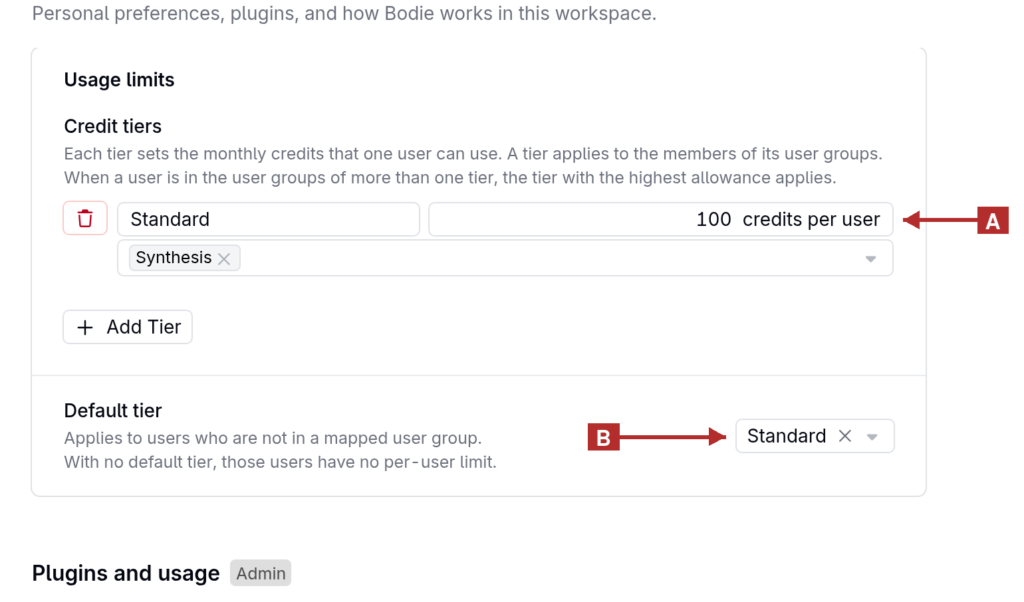
Admins can give each user a monthly Bodie AI credit allowance by setting up credit tiers and mapping user groups to them. For example, a Standard tier can give most users 100 credits per month, while a Power tier gives heavy users a larger allowance.
How It Works
- A credit tier sets the monthly credits that one user can use. A tier applies to the members of its user groups.
- When a user belongs to the user groups of more than one tier, the tier with the highest allowance applies.
- An optional Default tier applies to users who are not in a mapped user group. With no default tier, those users have no per-user limit.
- Allowances reset at the start of each month.
- Nothing changes until an admin creates a tier. The workspace’s overall credit pool still applies alongside per-user allowances.
Setting Up Credit Tiers
- In Bodie AI, select Settings and go to Usage limits.
- Under Credit tiers, select Add Tier.
- Enter a name for the tier and the number of credits per user.
- Select the user groups that the tier applies to.
- Optionally, under Default tier, choose a tier for users who are not in a mapped user group, or leave No default tier selected.
Tracking Your Usage
When a tier applies to you, the Bodie chat shows a small usage ring below the message box. Hover over or click the ring to see Monthly credits: the percentage used, the credits used out of your allowance, and the date the allowance resets.
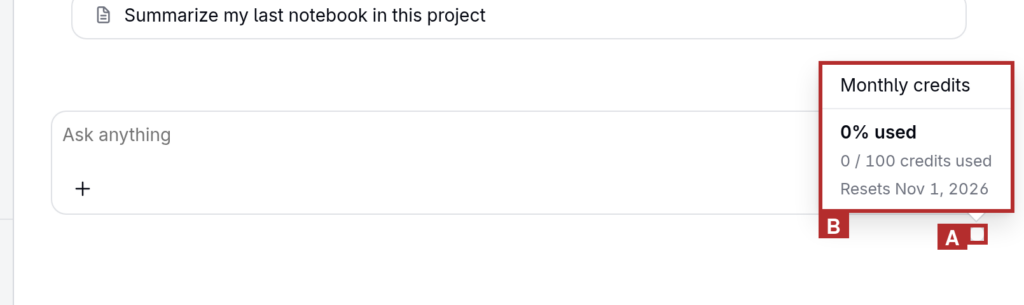
Users get a notice at 50%, 75%, and 90% of their allowance. At 100%, Bodie stops accepting new messages until the allowance resets at the start of the next month, and asks the user to contact their admin.
Admins can review each user’s tier, allowance, and remaining credits on the Usage Credits page.
To learn more about the Usage Credits page, refer to Bodie AI.
Permissions
Credit tiers are managed by admins in the workspace settings of Bodie AI.