
OR filters let you define multiple alternative sets of conditions when filtering a listing. A result matches if it satisfies all filters in any one group. Use this when you want A or B, instead of A and B.
What you can do with OR filters
- Combine alternate scenarios without duplicating views. For example, Lab Requests in Berlin OR Lab Requests assigned to me.
- Apply Quick Filters or search-bar suggestions across all groups at once, so common scoping like This Material Family stays consistent.
- Save and reload configurations, including OR groups, like any other listing configuration.
Creating OR Filters
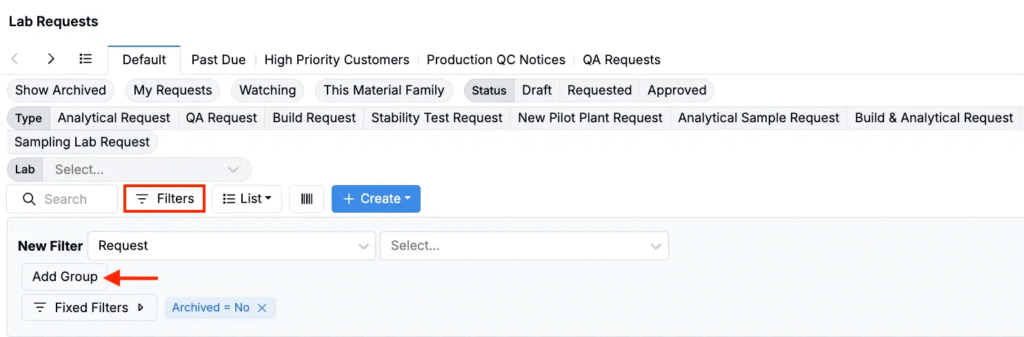
- Open any listing or dashboard and click Filters.
- In the Filters panel, click Add Group.
- Add filters within each group as needed.
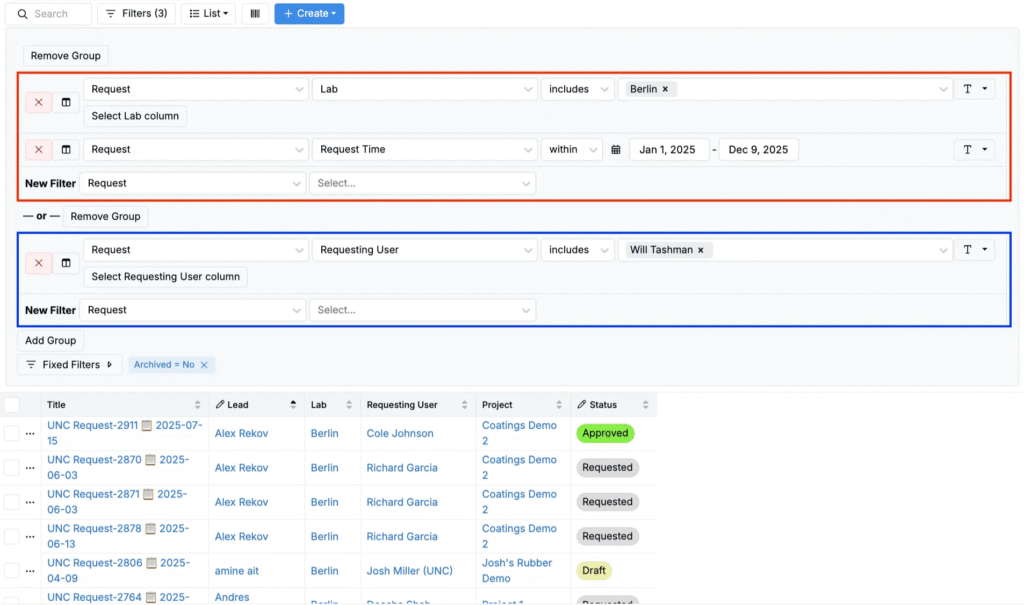
Once added, OR groups work like this:
- Within a group, entities must meet every filter (AND).
- Across groups, an entity appears if it satisfies any one complete group (OR).
For example, one group might require Location includes Berlin AND Request Time within Jan 1–Dec 9, 2025, while another requires Requesting User includes Will Tashman. A row appears if it matches either complete group.