
Many labs export measurement data directly from instruments or software into structured file formats like .csv or .txt. If these files follow a consistent format, Uncountable can be configured to ingest them automatically using uploaders.
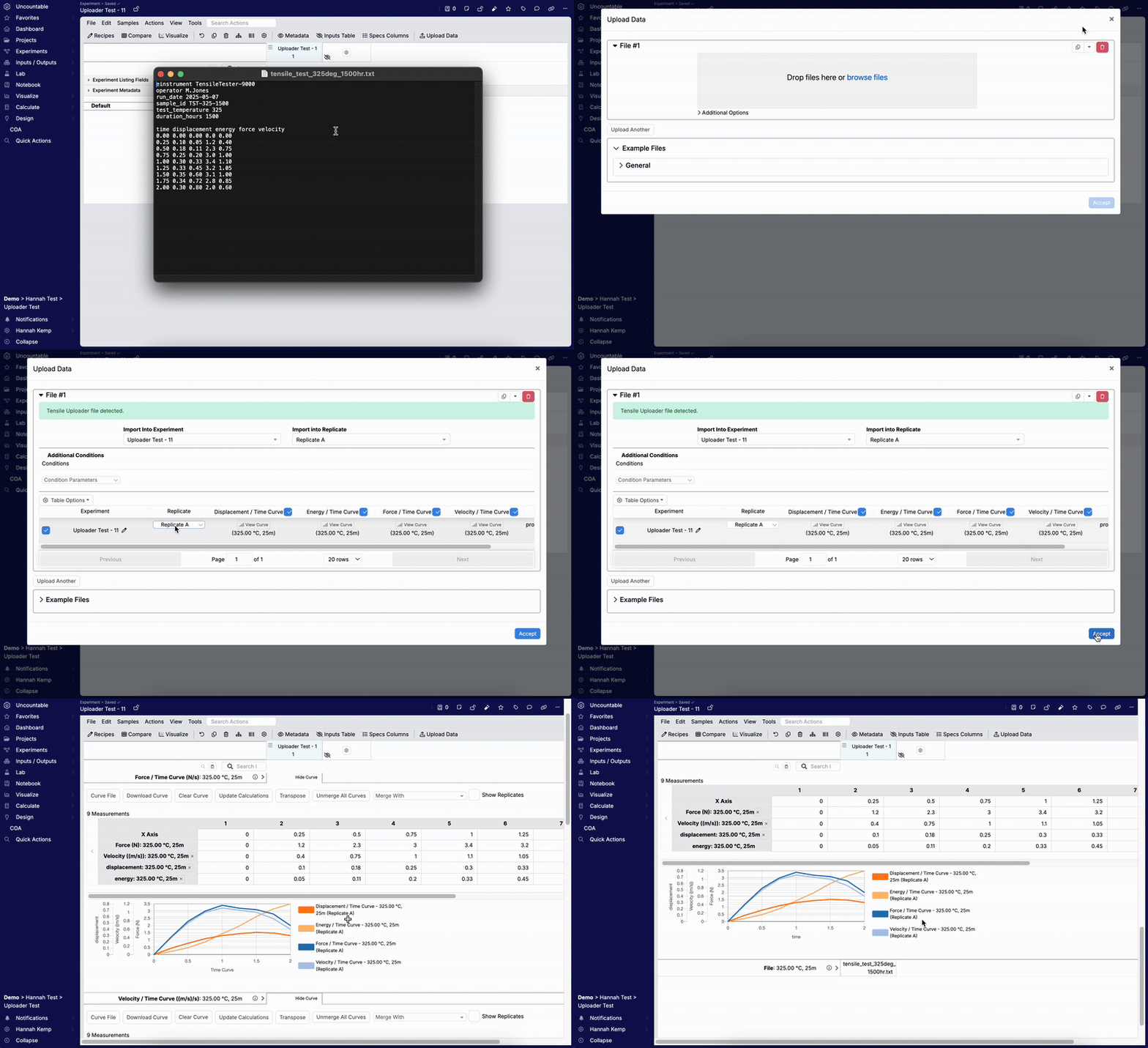
Uploaders allow users to drag and drop raw data files into the platform, where key values are parsed and mapped to the appropriate outputs, condition parameters, or metadata—eliminating the need for manual data entry. This reduces errors and saves time, especially when handling high volumes of test data.
Each uploader is set up by an Uncountable representative during implementation to match the structure of customer files. Once configured, the uploader automatically detects, extracts, and assigns data from similar files, making the import process fast, accurate, and scalable.
Core Concepts
- Parsing — Convert raw files into structured data using parser settings and blocks. Handle delimiters, headers, channels, units, and number formats.
- Mapping — Point parsed sources to their destinations in Uncountable: outputs, condition parameters, and experiment metadata. Curves and time series can map to curve‑type outputs.
- Matching — Optionally detect which experiment, replicate, or sample a file belongs to using filename patterns or embedded IDs.
General Workflow
- Open the Measurements view on the target experiment.
- Click Upload Data in the actions bar.
- Select from available uploaders.
- Review the uploader preview to confirm parsing and mappings.
- Click Accept to write values to outputs, condition parameters, and metadata.
Uploader Documentation Navigator
| Topic | Overview | Link to Documentation |
|---|---|---|
| Uploader FAQ | Quick answers to common uploader questions about parsing, mappings, matching, and review. | Uploader FAQ |
| Configuring Uploaders | Set up parsing rules and map parsed sources to outputs, condition parameters, and metadata. Optionally configure experiment matching. | Configuring Uploaders |
| Advanced Uploader Configuration | Configure complex files and edge cases such as multi‑channel data, units and number formats, curve and time‑series mapping, and step/replicate handling. | Advanced Uploader Configuration |
| Troubleshooting Uploaders | Diagnose preview errors and mismatches, verify parsing, and resolve mapping or matching issues. | Troubleshooting Uploaders |
When to use an Uploader vs an Importer
- Use an Uploader for file drops from instruments into a specific experiment, especially for time series and curves.
- Use an Importer for spreadsheet‑driven bulk creation or updates across many objects (ingredients, outputs libraries, inventory, projects, etc.).